5 Gamified Tools for Group Projects in K-12 Classrooms
Gamified tools can transform group projects in K-12 classrooms by making collaboration more engaging and balanced. These platforms use game-like elements - points, badges, leaderboards, and team challenges - to motivate students, improve participation, and ensure accountability. Below are five tools that help students work together effectively while building practical skills like communication and project management:
- Kahoot: Offers team-based quizzes with features like Team Mode, Team Talk, and collaborative kahoot creation. Scores are based on team averages, promoting shared responsibility.
- Gimkit: Features modes like Team Mode and KitCollab, where students collectively create and play games. Its virtual economy adds a layer of strategy and motivation.
- Classcraft: Combines role-playing with teamwork, letting students choose roles like Guardian or Healer. Group challenges like Boss Battles encourage collaboration.
- Minecraft Education Edition: Allows students to build and learn together in a shared virtual world. Tools like in-game cameras and coding features support teamwork.
- Pear Deck: Turns presentations into interactive, team-based activities. Features like Flashcard Factory and gamified XP systems encourage participation.
These tools not only make group work more engaging but also help address common challenges like uneven participation. By blending learning with fun, they create a collaborative environment where every student can contribute meaningfully.
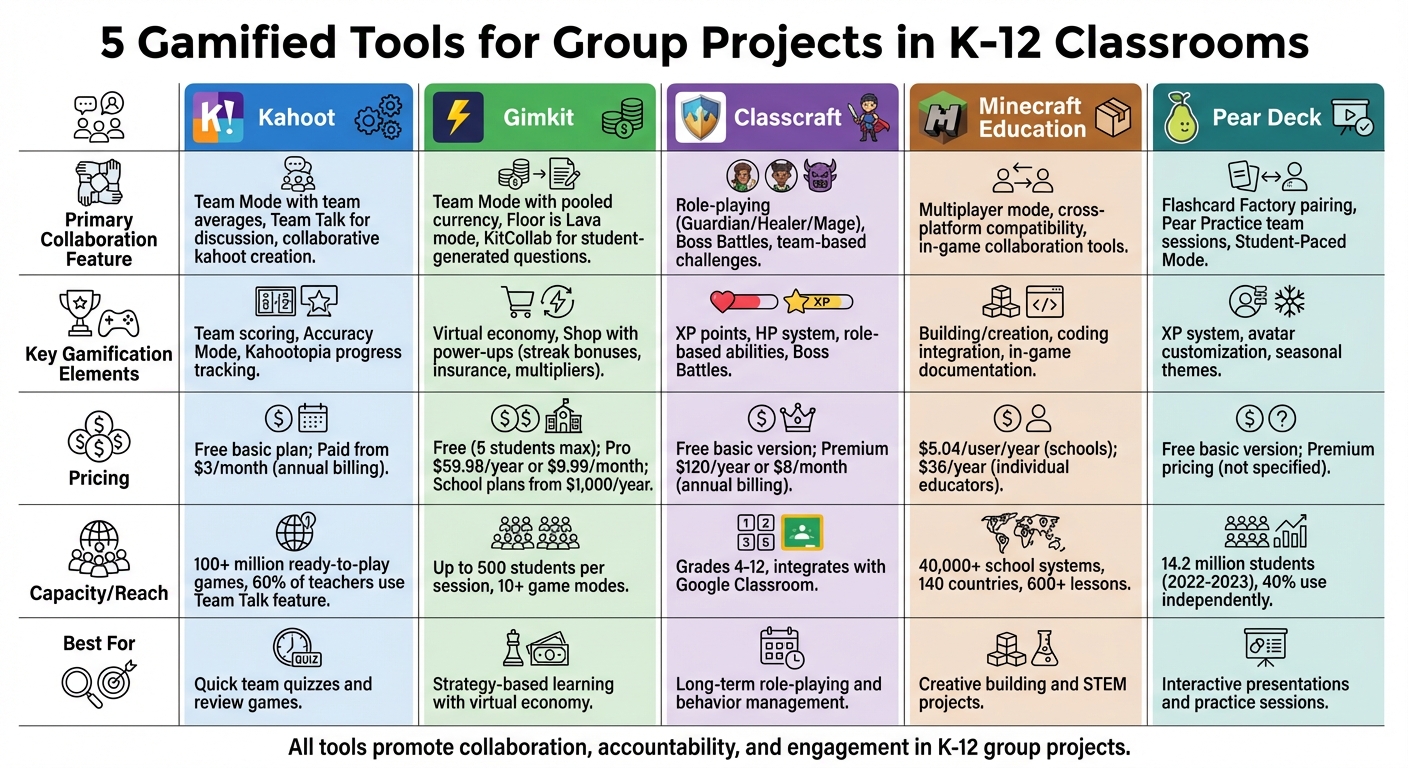
Comparison of 5 Gamified Tools for K-12 Group Projects
1. Kahoot
Team Collaboration Features
Kahoot's Team Mode turns individual quizzes into group challenges, where students use their own devices but compete as part of virtual teams. Scores are based on team averages, making it a great choice for classrooms, remote learning setups, or hybrid environments.
The Team Talk feature adds another layer of collaboration by giving students time to discuss their answers before submitting them. This encourages thoughtful debate and teamwork instead of rushing to respond. In fact, over 60% of surveyed teachers use this feature to help students develop collaboration skills.
Teachers can also tap into the Groups feature, which allows students to work together in private spaces to create their own kahoots as part of project assignments. This shifts students from passive learners to active creators, helping them engage more deeply with the material.
"Within a single tool, I can introduce a topic, review it, and check students' understanding. The game changes the environment, and even the more introverted students get into Kahoot! mood".
These tools create an engaging environment for teamwork, blending collaboration with Kahoot's game-based learning.
Gamification Elements
Kahoot uses a collective scoring system that ensures every team member's contribution matters, promoting shared accountability and investment. For classrooms prioritizing thoughtful analysis over speed, the Accuracy Mode rewards precision and careful thinking - ideal for projects requiring deeper understanding.
The platform's Kahootopia feature tracks overall class progress, unlocking rewards for the group and celebrating collective achievements rather than focusing solely on individual winners. Studies show that using Kahoot can improve academic performance by an entire letter grade on average.
Ease of Integration into Classroom Activities
Kahoot fits effortlessly into daily classroom routines, thanks to its integration with tools like Microsoft Teams, Google Classroom, Remind, and Apple Schoolwork. This makes assigning group challenges across platforms simple and efficient. Teachers can even use AI-powered tools to instantly create kahoots from PDFs, URLs, or Wikipedia articles, making it easy to align review games with specific topics.
The platform offers a free basic plan for schools, while paid plans start at $3 per month (billed annually), unlocking features like Accuracy Mode and higher player limits. With access to over 100 million ready-to-play games, teachers can choose from existing content or have students design their own kahoots as part of final projects.
sbb-itb-4f1eab7
2. Gimkit
Team Collaboration Features
Gimkit shines when it comes to group activities, offering modes that encourage teamwork and interaction. In Team Mode, students join forces, pooling their virtual currency to compete against other teams for the top leaderboard spot. Another exciting option is the Floor is Lava mode, where the entire class works together to avoid a virtual hazard by answering questions correctly. Both modes are designed to make collaboration fun and engaging.
The KitCollab feature takes collaboration to the next level by involving students in creating the game content. Here, students write and submit their own questions in real time, which teachers review and approve. These student-generated questions then become the foundation of the game everyone plays. Wenjing Huang, a Mandarin teacher at Wildwood School, highlights the platform's unique value:
"Gimkit is more than just a digital game. It empowers educators to use its image and audio features for interpretive formative assessments and fosters a positive collaborative environment when doing KitCollab".
These collaborative features blend seamlessly with Gimkit's game mechanics, making learning both interactive and enjoyable.
Gamification Elements
At the heart of Gimkit is its virtual economy, where correct answers earn rewards and mistakes come with penalties. This system keeps students engaged by mimicking the flow of real-world currency.
The Shop feature adds a layer of strategy, allowing students to spend their earnings on power-ups. Options include streak bonuses for extra points, insurance to protect against wrong answers, and multipliers to boost future earnings. These elements make the game more dynamic and keep students motivated to improve their performance. As Gimkit founder Josh Feinsilber puts it:
"I built Gimkit to be the kind of game I'd want to play in class".
Ease of Integration into Classroom Activities
Getting started with Gimkit is simple. Students can join games using a code, QR link, or direct URL. For teachers, the platform offers tools to save preparation time, like importing questions from Quizlet, spreadsheets, or the Gimkit gallery. Impressively, Gimkit can accommodate up to 500 students in a single live session and boasts over 10 different game modes.
For pricing, Gimkit provides options to suit different needs:
- Free Basic Plan: Limited to five students per game.
- Pro Plan: $59.98 per year (billed annually) or $9.99 per month.
- School-Wide Plans: Starting at $1,000 annually.
Teachers can also assign Kits as homework, allowing students to work independently toward a specific cash goal. This flexibility makes Gimkit a versatile tool for both live and asynchronous learning environments.
3. Classcraft
Team Collaboration Features
Classcraft takes gamified learning to the next level by blending role-playing elements with teamwork. It transforms group activities into an immersive adventure where students depend on one another to achieve success. Each student chooses a role - Guardian, Healer, or Mage - designed to create balanced, cooperative teams. Guardians act as protectors, absorbing damage for their group, Healers restore Health Points (HP), and Mages bring unique support abilities. This setup encourages students to work together and rely on each other's strengths.
One standout feature is the Boss Battles, which turn assessments into team-based challenges. Groups answer questions to defeat a virtual boss, with correct answers dealing damage and wrong ones resulting in penalties. Another clever tool is the Makus Valley Volume Meter, which uses the computer's microphone to monitor classroom noise. If the noise level gets too high, in-game penalties are triggered, keeping students mindful of their behavior.
Gamification Elements
Students earn XP (experience points) for positive academic and social actions, unlocking abilities that benefit their team. If a student loses all their HP, teammates can step in to help, preventing penalties. This shared responsibility motivates students to support one another and builds a sense of accountability. As Marianne Rogowski from Common Sense Education notes:
"When used thoughtfully, this classroom gamification can encourage positive behavior and develop essential collaboration skills."
Ease of Integration into Classroom Activities
Designed for grades 4–12, Classcraft integrates seamlessly with Google Classroom, allowing teachers to import rosters for a smoother setup. The free version includes basic features like point management and a "Wheel of Destiny" for random student selection. For more advanced tools, premium plans are available at $120 per year or $12.00 per month ($8.00/month when billed annually). While the initial setup might take some time, the platform offers options to customize consequences and adjust quest difficulty, making it adaptable to various classroom needs.
4. Minecraft Education Edition
Team Collaboration Features
Minecraft Education Edition transforms group projects into interactive, team-based adventures. Its multiplayer mode lets students collaborate in real time within the same virtual world, no matter their device or location, thanks to cross-platform compatibility. This makes it an excellent fit for hybrid classrooms where students may be working remotely or using different types of technology.
The platform comes equipped with tools that make tracking group progress simple. Students can use the in-game Camera to take snapshots of their creations or the "Book & Quill" feature to document reflections and export their work. For coding projects, the Code Builder tool allows teams to work together on block-based programming or dive into JavaScript and Python - all within the game. Teachers can also monitor and guide group activities seamlessly through Microsoft Teams and Flipgrid integration. These features create a dynamic environment for teamwork and learning.
Educational Value
Minecraft Education Edition is already part of the curriculum in over 40,000 school systems spanning 140 countries. With more than 600 lessons aligned to educational standards, the platform covers a wide range of subjects - not just STEM. Topics include History, Language Arts, Social-Emotional Learning, and Digital Citizenship. By gamifying education, Minecraft fosters collaboration while building critical skills like problem-solving, communication, and creativity.
"Minecraft Education motivates learning, improves attendance, and builds agency. Students practice critical thinking and collaboration in creative worlds."
Ease of Integration into Classroom Activities
For schools, the cost of Minecraft Education Edition is $5.04 per user annually. Individual educators or non-educational organizations can subscribe for $36.00 per year. To help new users get started, the platform offers free "Hour of Code" activities and demo lessons. Accessibility is also a priority, with features like Immersive Reader for text translation, UI screen readers, and customizable controls, ensuring that all students can engage fully in group projects.
5. Pear Deck
Team Collaboration Features
Pear Deck transforms traditional presentations into interactive, team-based experiences. Its Flashcard Factory pairs students to create vocabulary cards, encouraging fluency through group collaboration. Meanwhile, Pear Practice focuses on live team sessions that highlight cooperative problem-solving skills.
Features like the Overlaid Response Layout and Shared Teacher Dashboard enable educators to view student contributions simultaneously, allowing for coordinated support. For projects requiring varied paces, the Student-Paced Mode lets teams progress through slide decks independently, aligning with the broader trend of gamified tools that emphasize student-led interaction.
Gamification Elements
Pear Practice injects a game-like energy into group work by incorporating an Experience Points (XP) system. Students earn points for solving problems, which they can use to customize avatars and unlock accessories. Seasonal themes and customizable settings add an extra layer of engagement. Cecelia Gilliam, a Science Teacher at Hahnville High School, shares:
"I love that students who were previously reluctant to participate are more excited to participate because they're part of a team".
These gamified features not only inspire participation but also contribute to improved learning experiences.
Educational Value
During the 2022-2023 school year, over 14.2 million students interacted with Pear Deck lessons. Differentiated practice has led to a 15 percentage point increase in student performance, with 40% of students using Pear Practice independently beyond class requirements. The platform's anonymous response feature fosters a risk-free learning environment. Steph Sukow, a teacher at Crystal Lake South High School, notes:
"The anonymity of Pear Deck makes them feel comfortable to take risks, show mistakes, and gain insights into what their peers are thinking, too".
Ease of Integration into Classroom Activities
Pear Deck integrates seamlessly with Google Slides and PowerPoint Online, making it easy for teachers to turn existing presentations into interactive lessons. Its AI-powered Content Converter quickly transforms PDFs and worksheets into interactive formats, while Instant Lesson Packages create differentiated lessons, practice sets, and assessments in under a minute. While the free version offers basic interactive tools, Pear Deck Premium unlocks advanced features like the Shared Teacher Dashboard for enhanced collaboration.
The Best Apps to Gamify Your Classroom!
Conclusion
Gamified tools have transformed group projects into engaging, interactive experiences. Their impact on learning is backed by data. For instance, a quasi-experimental study found that students using gamified tools significantly outperformed their peers in traditional settings when it came to group cohesion and team member evaluations. This demonstrates the tangible benefits of gamified learning environments. Michele Haiken, a literacy teacher and ISTE author, perfectly sums up this shift in education:
"Failure is a source of feedback and learning, collaboration is necessary, and learning and assessment are tightly integrated".
Beyond improving academic outcomes, gamified tools help students develop essential modern skills. These platforms promote digital literacy, project management, and communication - skills that are indispensable for college and career readiness. They also nurture self-confidence, accountability, and respect for diverse viewpoints within collaborative settings.
For these tools to succeed, thoughtful implementation is key. Assigning specific roles like team leader or tech lead ensures active participation from all members. Activity dashboards can help track individual contributions, making grading fairer. Team contracts can set clear expectations for communication and responsibilities. Starting small - using just one or two tools initially - and designing milestones that genuinely require teamwork can help avoid the pitfall of individual work being mistaken for collaboration.
Whether it’s Kahoot, Classcraft, or Minecraft, gamified tools consistently create vibrant, skill-building environments. They not only make learning enjoyable but also prepare students with the tools they need to thrive in college and their future careers.
FAQs
How can gamified tools boost student engagement in group projects?
Gamified tools transform group projects into dynamic and interactive experiences by weaving in game-like elements such as competition, collaboration, and rewards. These features encourage students to dive into tasks with enthusiasm, making teamwork more engaging and enjoyable. When projects feel less like chores and more like challenges, students are naturally more inclined to stay involved and contribute actively.
Beyond just boosting engagement, gamification sparks creativity, sharpens critical thinking, and enhances communication within teams. It creates a sense of connection and shared purpose, helping students feel more invested in their work. The result? Improved participation and a richer, more rewarding learning experience for everyone involved.
How does role-playing enhance teamwork in classroom group projects?
Role-playing in classroom group projects helps students develop teamwork skills by allowing them to take on different roles and engage in practical problem-solving scenarios. This method encourages critical thinking, empathy, and effective communication, as students work together and consider various perspectives within a supportive environment.
It also strengthens social-emotional learning by fostering confidence and trust among classmates. Through practicing constructive behaviors and conflict resolution strategies, students learn how to collaborate more effectively with others. Role-playing not only makes learning more interactive and inclusive but also equips students with the tools they need for successful teamwork both inside and outside the classroom.
What’s the best way for teachers to incorporate gamified tools into their curriculum?
Teachers can bring gamified tools into their classrooms in ways that both boost engagement and support learning goals. Apps for quizzes or project-based platforms can turn lessons into interactive experiences, keeping students motivated while solidifying important concepts.
To get started, try incorporating these tools on a smaller scale to enhance your current lessons. Look for platforms that emphasize teamwork and creativity, giving students opportunities to collaborate on group projects or activities. It's also important to provide clear instructions and introduce these tools gradually, ensuring students feel comfortable with the changes. With careful planning and the right choices, gamified tools can make lessons more dynamic and enjoyable for everyone.