How CRM Analytics Boosts Revenue for Small Businesses
Small businesses lose revenue due to inconsistent sales, poor customer retention, and limited data insights. CRM analytics solves these problems by transforming raw customer data into actionable insights, helping businesses grow revenue and improve efficiency.
Here’s why CRM analytics matters:
- Revenue Growth: Businesses using CRM tools report a 41% increase in revenue per salesperson and are 86% more likely to exceed sales targets.
- Customer Retention: CRM adoption boosts customer retention by 25–40%.
- Efficiency: Automation saves 4–5 hours per week per salesperson, reducing manual tasks and improving focus on closing deals.
- ROI: For every $1 spent on CRM, businesses see an average return of $8.71.
CRM analytics centralizes scattered data, tracks key metrics like sales velocity and churn rate, and enables businesses to act on insights quickly. By leveraging tools like lead scoring, predictive analytics, and customer segmentation, small businesses can reduce inefficiencies, improve conversion rates, and focus on high-value customers.
Key takeaway: CRM analytics isn’t just about organizing data - it’s a tool to drive measurable revenue growth. Start by defining key metrics, cleaning your data, and creating dashboards that your team can use daily.
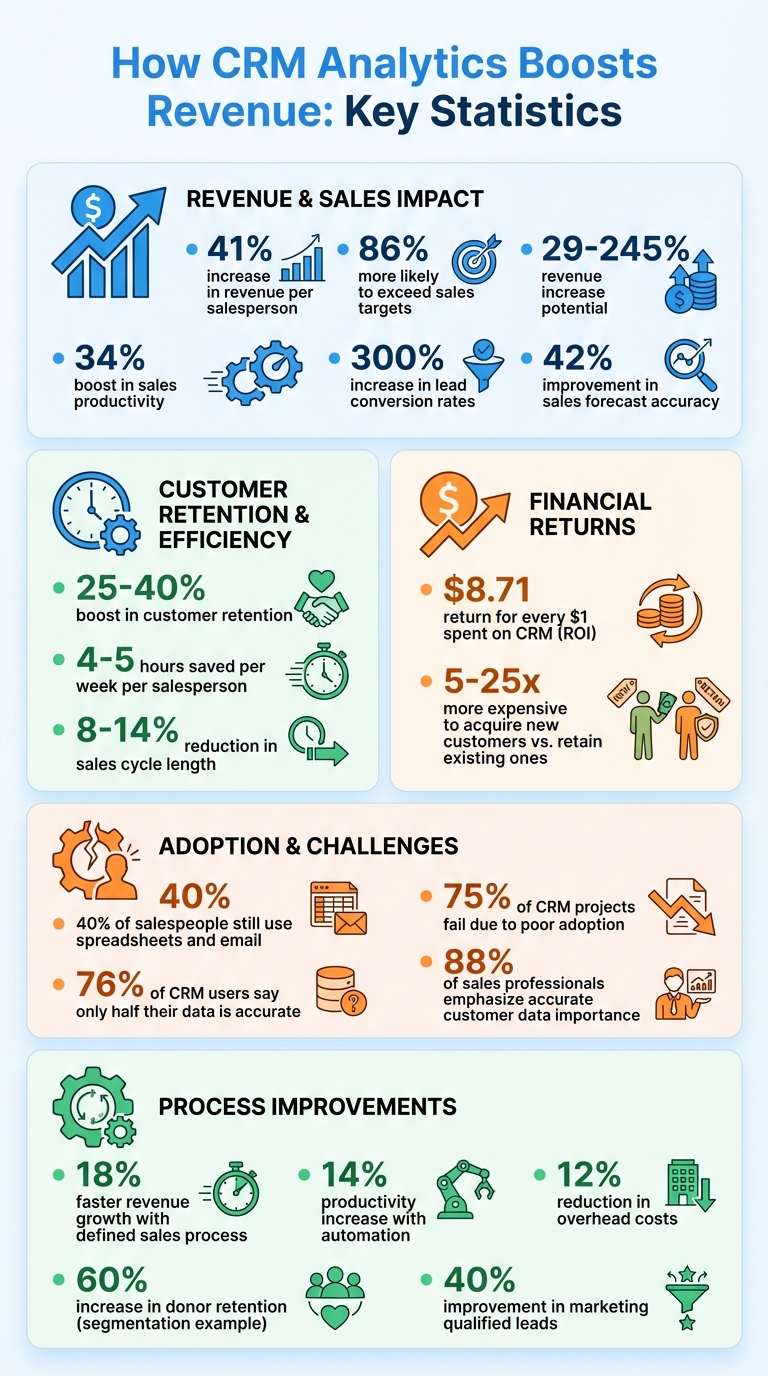
CRM Analytics ROI and Revenue Impact Statistics for Small Businesses
How CRM Analytics Drives Revenue Growth
Consolidating Data for Better Visibility
For many small businesses, customer data often ends up scattered across spreadsheets, emails, and random notes, making it tough to get a clear picture of operations. CRM analytics changes the game by pulling together all that data - sales calls, website visits, email interactions, and purchase histories - into one easy-to-navigate dashboard. This creates a unified view of each customer.
With this streamlined approach, businesses can spot revenue opportunities more effectively. Instead of relying on guesswork to figure out which leads might convert, sales teams can track the entire customer journey and spot buying signals as they emerge. For instance, a prospect who frequently visits pricing pages, downloads content, or engages in multiple email exchanges is likely a hotter lead than someone with minimal interaction. By consolidating this data, businesses can monitor key metrics that directly tie to revenue growth.
Key Metrics That Show Revenue Impact
CRM analytics doesn’t just organize data - it drives results. For example, sales forecast accuracy can improve by 42% when businesses rely on CRM tools instead of gut feelings. Sales productivity also gets a boost, climbing by as much as 34%, thanks to automation handling repetitive tasks and analytics highlighting the activities that truly close deals. Even lead conversion rates can skyrocket - by as much as 300% - when teams focus on data-backed insights.
The financial benefits are hard to ignore. A well-implemented CRM can deliver $8.71 for every dollar spent, showcasing its impressive ROI. Tracking metrics like the CAC-to-CLV ratio ensures marketing budgets stay in check. Meanwhile, pipeline velocity - factoring in deal count, average deal value, win rates, and sales cycle length - helps identify where deals tend to stall. And since acquiring new customers is anywhere from 5 to 25 times more expensive than retaining existing ones, keeping an eye on churn and retention rates is essential to protect profits. With these metrics in hand, businesses can turn insights into actionable strategies.
Turning Insights Into Revenue
The key to turning data into dollars lies in acting on insights quickly. For example, lead response time is critical - responding to a lead within 5 minutes significantly increases the chances of conversion compared to waiting longer. CRM analytics can also send instant alerts when high-value leads enter the system, ensuring your team reaches out while interest is still high.
Take AI bees, a Swiss B2B lead generation company, as a real-world example. Under CEO Syed Ali Nemath, the company implemented a custom Pipedrive CRM over a two-year period ending in 2025. This system unified lead tracking and automated client reporting across global markets. By cutting down on administrative tasks, the team could focus on closing deals, leading to an astounding 2,000% growth rate. This example highlights how acting on CRM-driven insights can fuel extraordinary business growth.
What is CRM Analytics for Small Business?
Common Data and Revenue Problems in Small Businesses
Even though CRM analytics can unlock growth opportunities, small businesses often face significant data challenges that hinder their progress.
Scattered Customer Data
Many small businesses store customer data across multiple platforms - emails, spreadsheets, and other informal tools. This scattered approach creates major roadblocks. In fact, 40% of salespeople still rely on spreadsheets and email programs to manage customer information. The result? Sales teams struggle to access interaction histories, marketing efforts lose precision when identifying effective campaigns, and support teams lack the context needed to address customer issues effectively.
The financial consequences can be steep. For example, in December 2025, NTVAL, a strategic valve manufacturer led by CEO Bruce Zheng, made a pivotal change. By transitioning from basic Excel tracking to AI-driven analytics, the company uncovered 30 metric tons of overstocked raw materials annually, saving $150,000 in holding costs. This move also cut downtime by 60 hours per month and generated an additional $500,000 in yearly revenue. When businesses fail to integrate their data, they miss out on opportunities to enhance operations and improve profitability.
Missed Follow-Ups and Low Conversion Rates
Without a centralized system, sales teams often miss crucial follow-ups and lose track of where leads stand in the sales funnel. This lack of organization directly impacts conversion rates. However, companies that adopt a CRM system often experience up to a 300% increase in lead conversion rates.
Centralized data not only boosts productivity but also saves time. Sales teams can reclaim 4–5 hours each week by eliminating manual data entry. With this extra time, they can focus on engaging with prospects more effectively. Moreover, giving salespeople immediate access to data can reduce sales cycles by 8% to 14%, enabling them to close deals faster.
Unprofitable Customer Segments
Small businesses frequently waste resources on customer segments that don't deliver a strong return. Without proper analytics, it’s challenging to identify which customers are worth investing in and which ones drain resources without contributing to revenue.
CRM analytics offers a solution with RFM analysis (recency, frequency, monetary value). This method segments customers based on their buying habits - how recently they made a purchase, how often they buy, and how much they spend. By focusing on high-value customers, businesses can predict churn and address it before it impacts revenue. Companies leveraging advanced CRM analytics report an average 25% increase in sales and a 10% rise in revenue.
Mary Zhang, Head of Marketing and Finance at Dgtl Infra, shared her experience: "When we shifted from gut-feel to data-backed strategies in our marketing, we saw a 40 percent increase in campaign effectiveness".
sbb-itb-4f1eab7
CRM Analytics Strategies to Boost Revenue
Once you’ve identified the challenges holding your business back, the next move is to leverage CRM analytics with strategies that directly impact your revenue.
Segmenting Customers for Targeted Campaigns
By analyzing customer behavior and purchase patterns, you can segment your audience to deliver timely, personalized messages. This approach matters - 73% of customers say being treated as an individual, not just a number, is crucial to earning their trust and loyalty. Furthermore, 71% expect brands to offer personalized interactions, and 76% feel frustrated when they don’t receive them.
One effective method is RFM analysis (Recency, Frequency, Monetary value), which helps you prioritize high-value customers. For example:
- Create a "High Spenders" segment for customers with large average order values and send them exclusive offers or tailored recommendations.
- Target customers who haven’t purchased in over 90 days with win-back campaigns, offering special incentives to reactivate them.
The results can be striking. A mid-sized organization that adopted segmentation achieved a 60% increase in donor retention and a 40% boost in average gift size. Similarly, tailoring campaigns by government agency size led to a 40% improvement in marketing qualified leads. Even psychographic segmentation - grouping by personality traits or values - can increase conversion rates by as much as 45%.
Automation plays a key role here. By using CRM workflows to automatically update segments in real time as customer behaviors evolve, you can stay one step ahead.
With well-defined customer segments, the next priority is refining your sales pipeline to turn these insights into closed deals.
Improving Sales Pipelines with Analytics
A streamlined sales pipeline can help you recover lost revenue by identifying bottlenecks. Companies with a clearly defined sales process grow revenue 18% faster than those without one. Yet, 63% of sales managers admit their teams struggle to manage pipelines effectively.
To improve your pipeline:
- Establish clear exit criteria for each stage of the sales process.
- Use lead scoring, based on historical win rates, to focus on high-potential deals.
Automation is another game-changer. Sales teams that automate processes like reminders and email sequences see a 14% productivity increase while cutting overhead by 12%. Automated follow-ups are especially critical - closing a deal often takes an average of eight touches, but 44% of salespeople give up after just one contact.
Regularly review your pipeline metrics. Calculate pipeline velocity and analyze dashboards weekly to spot stalled deals and adjust your approach. Maintaining a pipeline coverage ratio of 3× to 6× your revenue target ensures a safety net for deals that fall through.
These strategies not only accelerate deal closures but also have a direct impact on your revenue.
Using Predictive Analytics
Predictive analytics transforms CRM from a historical record-keeping tool into a forward-looking engine for growth. By automatically scoring leads based on factors like past purchases, email engagement, and website activity, you can prioritize prospects most likely to convert. This approach has been shown to boost lead conversion rates by up to 300%.
Churn prediction tools are another powerful feature. By monitoring engagement metrics and support interactions, these tools can flag at-risk customers, allowing you to intervene with personalized offers before they cancel. Businesses using advanced generative AI in their CRM are 83% more likely to hit or exceed their sales goals.
Predictive analytics also enhances sales forecasting. By analyzing historical data, you can adjust inventory levels, marketing budgets, and pricing strategies in advance. CRM platforms that include forecasting tools improve accuracy by 42%, helping you allocate resources more effectively.
Beyond forecasting, predictive tools can automate upselling and cross-selling. For instance, your CRM might suggest complementary products based on a customer’s purchase history. This kind of automation delivers results - on average, businesses see a return of $8.71 for every dollar spent on CRM.
To make the most of predictive analytics, it’s essential to centralize and clean your customer data. Reliable forecasts depend on high-quality historical data. Additionally, integrating AI tools, such as sentiment analysis for emails and reviews, can help you address customer dissatisfaction before it escalates.
How to Implement CRM Analytics in Your Small Business
Getting started with CRM analytics doesn’t have to be expensive or overly complex. By following a clear plan - defining key metrics, cleaning your data, and preparing your team - you can make CRM analytics work for your business.
Define Key Revenue Metrics
Start by identifying the metrics that directly impact your revenue, such as Customer Lifetime Value (CLV), Customer Acquisition Cost (CAC), churn rate, and sales velocity. These indicators help you understand whether your spending is driving growth. For instance, if your CAC is higher than your CLV, you’re essentially losing money on every customer.
Pay close attention to your churn rate, which measures the percentage of customers who stop buying from you over a specific period. A rising churn rate could signal issues with your product, service, or overall customer experience. Another critical metric is sales velocity, which tracks how quickly deals move through your pipeline. This can help you identify bottlenecks and improve revenue forecasting.
By focusing on these metrics, you’ll have a solid foundation for cleaning your data and designing dashboards that drive growth.
Centralize and Clean Customer Data
Did you know that 76% of CRM users say only half of their data is accurate and complete? That’s a big problem, but one you can solve with a systematic approach to data management. Start by auditing all your customer data sources - CRM, marketing tools, spreadsheets, and support systems. Migrate data in phases, tackling accounts first, then moving on to contacts, deals, and activities. Along the way, standardize formats, remove duplicates, and set up validation rules to maintain data quality.
Make sure to enforce data quality at the point of entry. For example, set up validation rules and required fields on web forms to ensure clean data from the start. Automate monthly deduplication checks to merge records with matching emails or phone numbers. Remember, data doesn’t stay static - people change jobs, companies merge, and information becomes outdated. Building systems that clean data as it’s added is far more effective than sporadic, large-scale cleanup projects.
With clean, centralized data, you’ll be ready to create dashboards and empower your team to make data-driven decisions.
Build Dashboards and Train Teams
Leverage your CRM’s analytics tools to create dashboards that highlight key visuals like pipeline value and win/loss rates. Assign a tech-savvy team member to lead the charge, use vendor-provided training materials, and develop easy-to-follow guides to encourage adoption. Keep in mind that about 75% of CRM projects fail due to poor user adoption and technical challenges - so training is critical.
Make analytics part of your team’s routine. For example, review stale deals every Friday or analyze lead quality by source every month. Set up automated alerts for key actions like lead follow-ups or renewal reminders to ensure your team acts on insights immediately. With 88% of sales professionals emphasizing the importance of accurate customer data for decision-making, investing time in proper training and dashboard setup will yield quick results.
Conclusion
CRM analytics plays a key role in turning raw data into real revenue. By bringing together customer insights from sales, marketing, and service teams into one centralized system, it removes the need for costly guesswork. With an impressive average ROI of $8.71 for every $1 spent and the potential to increase revenue by 29% to 245%, it’s clear that CRM analytics isn’t just a tool - it’s a game-changer.
Switching from intuition-based decisions to data-driven strategies helps your team stay ahead of challenges like churn and missed opportunities. Metrics such as Customer Lifetime Value, churn rate, and sales velocity provide actionable insights, helping you tackle problems before they grow and seize new opportunities faster. Plus, having clean, consolidated data means your team spends less time searching for answers and more time closing deals.
To make the most of CRM analytics, start by identifying your key revenue metrics. Clean up your existing data and create simple, easy-to-use dashboards that your team can rely on daily. Consistent use of these tools - not just during quarterly reviews - can streamline processes, improve decision-making, and ultimately drive higher revenue. Training your team to integrate analytics into their regular workflow ensures these insights become a natural part of your business routine, setting you up for long-term success.
FAQs
How does CRM analytics help small businesses retain customers?
CRM analytics gives small businesses the edge they need to hold onto their customers by turning raw data into clear, actionable insights. By diving into customer behavior - like buying habits, how they use products, and their interactions with support - businesses can craft personalized messages and offers that boost engagement and cut down on churn.
Built-in predictive tools in CRM systems can flag customers who might leave, allowing teams to step in early. For example, they can send customized win-back emails or offer loyalty rewards to keep those customers around. On top of that, CRM dashboards make it easy to keep an eye on important metrics like churn rates, repeat purchases, and customer lifetime value. These numbers help businesses spot trends and tweak their strategies as needed. Even small retention gains can lead to notable revenue growth, making CRM analytics a smart investment for long-term success.
What steps should small businesses take to start using CRM analytics effectively?
To get the most out of CRM analytics, start by setting clear business goals that tie directly to your revenue priorities. For example, you might aim to improve customer retention, boost average order value, or streamline your sales process. Once you've defined your objectives, take a close look at the data already stored in your CRM. Identify what's available, pinpoint any gaps, and ensure the data is clean and reliable before moving forward.
Next, select a CRM platform that matches your team’s technical expertise and fits within your budget. Focus on tracking essential metrics like pipeline value, conversion rates, and customer behavior. Keep things straightforward during the initial setup - this makes it easier for your team to adapt and start using the system effectively.
Lastly, provide proper training and support to ensure your team knows how to interpret and act on the insights generated. Tools like DashK12 offer resources such as workshops, e-books, and courses to help your staff make the most of CRM analytics. By combining clear goals, accurate data, and practical training, you can turn CRM analytics into a powerful tool for driving business growth.
How can CRM analytics help small businesses improve sales forecasting?
CRM analytics empowers small businesses to refine their sales forecasting by turning customer and sales data into actionable insights. By examining historical patterns like win rates, deal sizes, and sales cycles, these tools can predict the chances of closing deals and project revenue with greater accuracy. This removes the guesswork and provides a sharper view of future sales.
With features like predictive scoring, sales teams can zero in on high-priority opportunities, while managers can experiment with strategies - such as adjusting pricing or launching seasonal promotions - using scenario-planning tools. These insights help small businesses allocate resources wisely, adapt strategies quickly, and minimize forecast errors, paving the way for smarter decisions and consistent revenue growth.
For businesses ready to tap into these benefits, DashK12 offers consulting and training services to help set up CRM dashboards, interpret data, and incorporate predictive forecasting into everyday workflows. This ensures small businesses can confidently make data-driven decisions.